Select a month below:
This is the multi-page printable view of this section. Click here to print.
Changes in 2025
Changes and updates released in 2025
- 1: December 2025
- 2: November 2025
- 3: October 2025
- 4: September 2025
- 5: August 2025
- 6: July 2025
- 7: June 2025
- 8: May 2025
- 9: April 2025
- 10: March 2025
- 11: February 2025
- 12: January 2025
1 - December 2025
Changes and updates released in December 2025
Improved nested schedule import handling
The behaviour of imported shifts for Nested schedules with a destination configured in bidirectional mode has been improved to import the assignment changes to the appropriate child schedule, rather than overwriting the reference to the child in the parent schedule.
Calendar performance improvements
The calendar view now lazy-loads events, rendering only the visible date range rather than loading all events upfront. This provides a noticeable improvement in page load times for schedules with a large number of shifts.
Bugfixes and minor changes
- When importing shifts via CSV, On-Call Optimizer now supports files that do not include a header row, making it easier to import data from a wider range of sources.
- Fixed the swap shift dialog to show a clear error state when the target shift cannot be found.
- Fixed a bug where the requester was not correctly handled on swaps involving a nested shift.
- Added locking to eliminate overlapping import operations from producing inconsistent shift assignments.
2 - November 2025
Changes and updates released in November 2025
Improvements when changing nested shift assignees
When changing (e.g. via a swap, take or reassign action) a shift that uses nesting, On-Call Optimizer will now determine whether to default to changing the reference or the source shift itself:
- If the referenced shift belongs to a schedule with no destinations configured, which is only referenced by one schedule, On-Call Optimizer will default to changing the source shift, leaving the reference unchanged.
- If the referenced shift belongs to a schedule with destinations configured, or which is referenced by multiple schedules, On-Call Optimizer will default to replacing the reference, leaving the source shift unchanged.
Regardless of the default behaviour selected by On-Call Optimizer, additional information to inform the user of any referenced or dependent shifts related to the change being made is now provided, along with new options that allow choosing to change only specific dependent shifts, or to change the source shift as desired.
Bugfixes and minor changes
- Shifts with a pending swap request now show an indicator to highlight this state in the calendar view.
- The notification text in cases where skipped shifts are present in a destination event has been clarified.
- Fixed a divide by zero error breaking assignment for schedules where a member had a single-minute duration availability event.
- When login is required, On-Call Optimizer now remembers the original page requested and redirects back after login completes.
- User mismatch errors between On-Call Optimizer and a configured destination on a schedule are now explicitly reported, previously users unable to be found in the destination caused the shift to be skipped and reported as not exported without any particular details as to why.
- The export and synchronization of On-Call Optimizer shifts with external destinations such as Pagerduty has been significantly improved to more robustly handle known failure cases and eliminate race conditions when parallel changes are made at the same (or within a short window) of time.
- The destination detail page now only lists events that changed the destination or encountered an error by default. The filter settings above the event table can be used to view all events if necessary.
- The destination export event detail page has been improved to more concisely report any errors encountered.
- Multiple bugs that resulting in extraneous imported assignments containing short shifts whose assignee had not changed from the existing assignee in On-Call Optimizer have been resolved.
3 - October 2025
Changes and updates released in October 2025
Time zone configuration
Two major improvements have been released to improve the flexibility of time zone configuration:
- You can now specify a specific time zone to use for displaying dates and times instead of using the automatically detected time zone from your system.
- If the detected time zone changes from what was originally observed when your account was created, a pop-up will now prompt you to confirm whether you want to update the stored value (e.g. if you have permanently moved country) or ignore the change (e.g. during a short trip).
Specifying a time zone or triggering a refresh of the detected system time zone can be accomplished on your profile page.
Override “out of office” event blocks
You can now annotate out of office events from your calendar that are not intended to block shift assignments using allow-oncall or allow oncall tags in the event title
or description. This can be useful to distinguish cases where you are using the out of office functionality to block or reject meetings during a particular period of time,
but are still available for on-call.
Annotating an out of office event with the allow-oncall tag will result in the time period being treated as if no event was present on the calendar at all. You can now also use
prefer-oncall tag to convert an out of office event into an availability entry indicating a preference at that period of time.
For more details, refer to the calendar availability documentation.
Add additional responders to a swap
When creating a swap request, it is now possible to add additional responders (including users not normally present within the schedule) to the list to be notified and evaluated as candidates for the shift.
Restrict members of an assignment group to a single role per shift
A new capability has been added to ensure that members of a specified assignment group can only be assigned to a single role in a shift. A common use-case for this capability is to ensure that newer team members are only scheduled alongside more experienced team members, preventing the assignment of two newer members at the same time.
Bugfixes and minor changes
- Fixed display of time zone offset from UTC in profile and schedule configuration drop-downs to correctly show the offset including DST rather than always showing the time zone’s base offset from UTC.
- Fixed a bug that resulted in the notification of any cancelled swap including a message that the user was no longer assigned to the shift - even when they were!
- Fixed status refresh and updates on the calendar connection pages.
- The display of nested schedules on the home screen has been improved to better handle cases where the child schedules are not exported or used directly by only displaying the shifts in the resulting parent schedule that you are assigned (rather than showing the shifts assigned in the underlying child schedules).
- Fixed links from within shift popups to correctly open in the main window rather than within the popup itself!
- Fixed display of nested shifts in certain edge-case scenarios to show the actual assignee rather than the internal shift reference UUID.
- Significant reliabiltiy and robustness improvements to the Splunk integration.
- Added assignment CSV import/export capability.
4 - September 2025
Changes and updates released in September 2025
Member management and invitation
Adding and inviting members to On-Call Optimizer now occurs via the organization configuration, not via an individual schedule.
- To add/invite members to your organization in On-Call Optimizer, click the profile icon in the top right corner, select the organization name and then select the Members tab.
- The schedule members tab now provides a searchable combo box to allow quick addition of existing organization members to a schedule.
The required 1:1 link between members of an On-Call Optimizer and Pagerduty schedule that existed when the On-Call Optimizer schedule was originally created from a Pagerduty schedule has been removed to provide smoother, more consistent and more flexible management of schedule members. You can now always add members to an On-Call Optimizer schedule, where previously schedules created from a Pagerduty schedule require you to add users in Pagerduty!
Schedule synchronization with Pagerduty
To provide consistency and simplicity of behavior, ongoing synchronization of the schedule name and time zone from Pagerduty has also been removed to avoid confusion between different parts of the schedule configuration being imported/synchronized or not. Creating a schedule from an existing Pagerduty schedule is now a one-time import of details, allowing for quick set-up/creation of an On-Call Optimizer schedule, after which the name, time zone and members will be fully managed in On-Call Optimizer independent of any future changes to their value in Pagerduty.
Thes change only impact the configuration of the schedule members, name and time zone - the export/import of the actual shifts and assignment details continues to operate as-is.
Bugfixes and minor changes
- Fixed dark mode styling in dialogs.
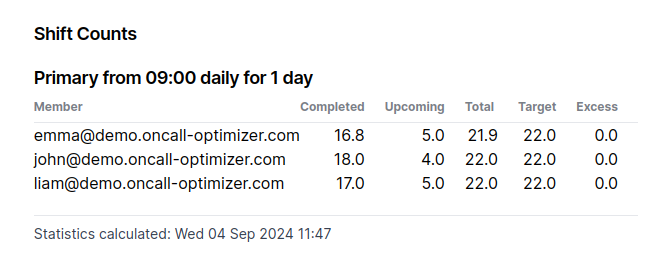
- Simplified the display of member balance to show the sum of each member’s assignments across all shift types by default.
Assignments for individual shift types can be expanded by selecting the
Show detailed balancelink under the table. - Dropped unnecessary restrictions on punctuation in schedule names to allow for names such as ‘Team (EMEA)’ and ‘Team - Subteam [Note]’.
- Fixed a bug for schedules with nested shifts which caused missing popup content if the shifts in the child schedule have different start times to the parent shift.
- Fixed a bug that prevented an infeasible swap from being cancelled.
- Fixed a bug resulting in parts of the destination detail pages not being updated with new state while a refresh operation was in progress.
5 - August 2025
Changes and updates released in August 2025
Time/date formats with time zone descriptions
Additional time and date formats that include the time zone have been added.
| Available formats are now: | |
|---|---|
| Friendly (default) | Thu 05 Jun 2025 09:18 |
| Friendly with time zone | Thu 05 Jun 2025 09:18 PDT |
| Concise | 2025-06-05 09:18 |
| Concise with time zone | 2025-06-05 09:18 PDT |
| Concise with day | Thu 2025-06-05 09:18 |
| Concise with day and time zone | Thu 2025-06-05 09:18 PDT |
The preferred time format setting can be found on your profile page
(accessible by clicking the user icon in the top-right corner of the application, and selecting My Profile).
Configurable Slack time/date formats
Users in organizations with a configured Slack connection can now configure any of the formats above to be used in personal notifications or messages sent to configured channels in Slack.
- To override Slack’s default format and use your preferred time format for personal notifications, enable the
Slack Time Formattoggle on your profile page. - To configure a preferred time format for a specific channel, send a
time_format set <format-name>message to On-Call Optimizer in the channel.
The slack documentation has been updated with further information and configuration details.
Bugfixes and minor changes
- Prevented destinations that are up to date from sending “reminders” of their up to date status every 7 days.
- Improved mobile display and layout responsiveness on the swap response screen for schedules containing members with long names.
- Optimized rendering performance for schedules with many shifts per month displayed on the calendar.
- Eliminated incorrect override removed notifications that were being generated for overrides that had actually been exported by On-Call Optimizer, but were exported more than a week ago!
- Fixed an issue causing shifts that are eligible for swapping to not be listed on the swap response page in cases where different time zones are configured between the swap requester, responder and the schedule.
6 - July 2025
Changes and updates released in July 2025
Destination status notifications
A new notification has been added to alert schedule admins when a configured destination is out of date, has pending changes or requires their attention for any other reason.
Combined with the improved operational modes described below these new notifications ensure schedule admins can have confidence that the intended schedule assignments are consistent between On-Call Optimizer and all configured destinations.
Destination status notifications are enabled by default for all schedule admins.
The destination documentation has been updated with further information and configuration details.
Destination operational modes
Three different operational modes are now available to provide flexibility in how On-Call Optimizer imports and exports shifts to and from configured destinations, particularly when faced with unexpected changes that must be reconciled.
- Authoritative (default for new schedules) - On-Call Optimizer is the source of truth for the schedule and makes the necessary changes to the destination to align it with the schedule in On-Call Optimizer.
- Bidirectional - On-Call Optimizer is the source of truth for all assignments made directly in On-Call Optimizer but will also import changes that are made to previously exported shifts back into the On-Call Optimizer schedule from the destination.
- Manual Export - On-Call Optimizer is the source of truth for the schedule (like authoritative mode), but will only make changes to the destination when an export operation is manually triggered by a user.
The new operational mode configuration replaces the previous enabled/disabled destination configuration setting once selected on a schedule. Until that time existing destinations continue to operate with unchanged behaviour (shown as Export on change (deprecated) in the app).
Schedule owners will be contacted to coordinate migration over the next week or two. Feel free to update your schedules at any point however - the new operational modes are better in every respect!
More details and a full description of the behaviour of each mode can be found in the destination documentation.
Refreshed destination and export history pages
The destinations tab within a schedule has been refreshed to provide greater visibility into the current state of shifts that have been exported and the history of previous exports.
Organization administration improvements
The organization section has been updated to separate the member list and role permissions from general settings using tabs.
- The display name of the organization is now configurable on the general organization settings tab.
- The members tab now displays the calendar and slack connection status for each member - allowing adminstrators to see at a glance how onboarding of the organization is progressing.
- Adminstrators can now invite members to On-Call Optimizer directly from the organization members tab without first having to add them to a schedule.
- Additional role permissions have been enabled allowing members of an organisation to be granted the ability to create and manage schedules, and/or create and manage integration connections (e.g. On-Call Products, Slack). These permissions can be configured on the organization roles tab.
To access the organization section, click on the organization’s name in the menu accessed by clicking the profile icon in the top-right of On-Call Optimizer.
Override removal notification
A new notification is available when On-Call Optimizer removes an override (aka shift) from a destination schedule in a linked on-call product such as Pagerduty.
A potential use-case for this feature is to provide a warning if a team member has attempted to swap or reassign a shift directly in Pagerduty (or another linked product) rather than On-Call Optimizer and is therefore overwritten by On-Call Optimizer’s normal export process!
For more details on how this notification works and how to enable it see the destination documentation.
Notification method flexibility
You can now choose to receive each notification via any combination of available notification methods. For example you can choose to receive new assignment notifications only via email and swap response notifications only via Slack, or even if you prefer via both email and Slack in parallel!
Configure your notification preferences via your profile page.
Improvements to assignee change processs
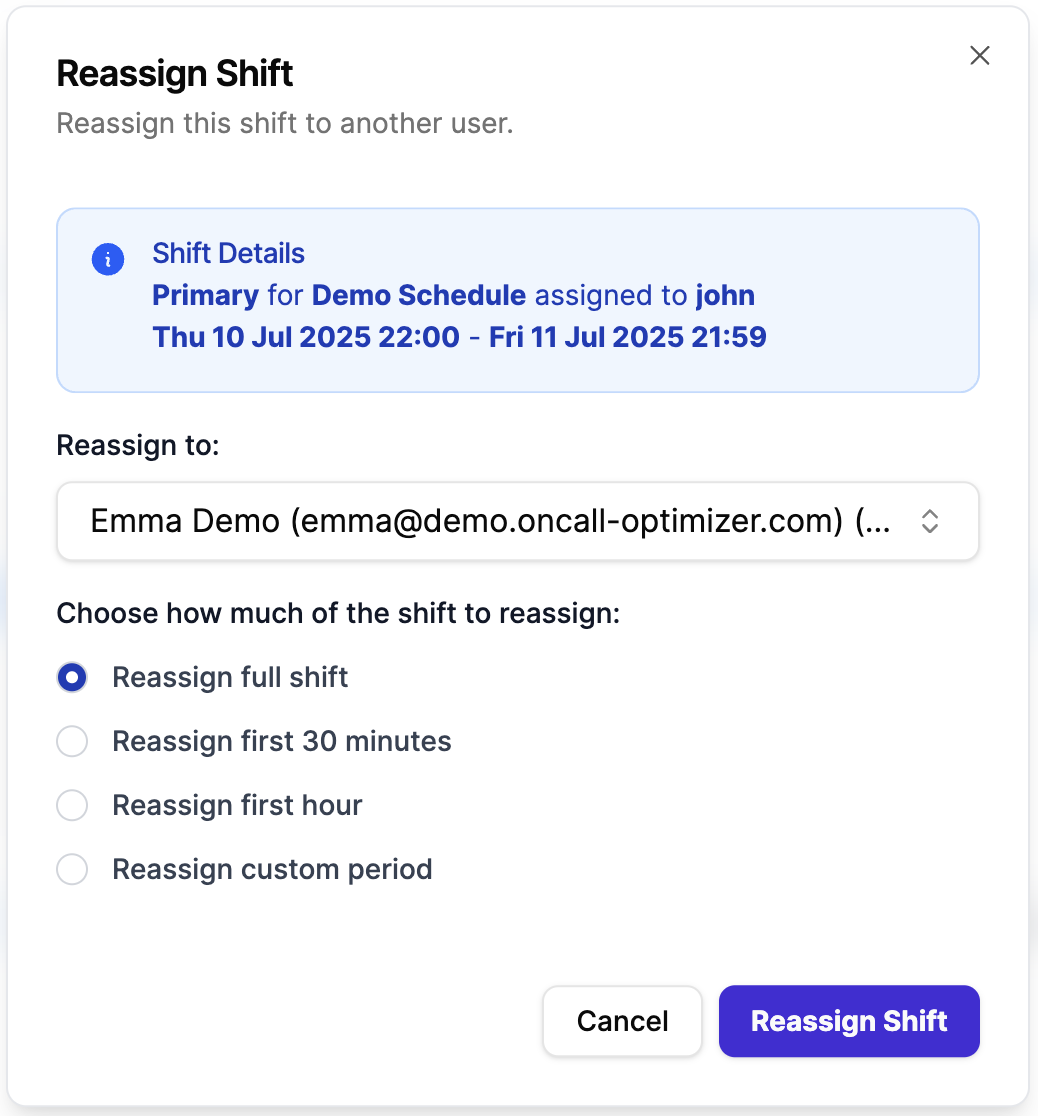
A refreshed and standardized interface that provides fast and intuitive confirmation of assignee change actions is also the home of two major improvements in the ability to change the assignee for a shift. The assignee change actions remain accessible via the icons to the right of the assignee name in the shift popup dialog.
Configurable assignment periods
When changing the assignee for a shift there is now the option to specify how much of the shift is changed.
- New 30 minutes, or 1 hour options provide a simple method for temporarily providing coverage for a teammate while they are unavailable during a meeting or a commute. These options apply to the start of the shift for future shifts, and the next 30 minutes or 1 hour if the current shift is being changed.
- The traditional options to change the entire (or remaining portion of the current) shift, or specify a completely custom period of time within the shift still remain available also.
Reassign directly to another user
On-Call Optimizer now allows any member of a schedule to directly reassign a shift to any member of the organization using the reassign ( ) icon. In the confirmation dialog that is displayed:
- You must select the user to which the shift should now be assigned.
- The reassignment can be specified to be for any of the four time periods described above.
The new assignee will receive a notification that the shift is now assigned to them.
Bugfixes and minor changes
- The design and layout of the destination table within each schedule has been improved and streamlined to more clearly present the configuration and status of any linked destinations.
7 - June 2025
Changes and updates released in June 2025
SOC2 Compliance
On-Call Optimizer’s SOC2 Type II report has been issued providing third party validation of our commitment to security & compliance and demonstrating how important it is to use to build, earn and retain our customer’s trust.
If you require a copy of our SCO2 report please request access to our trust center, or read the blog post for more details.
Configurable time/date format
A new user setting has been added to provide choice over how dates and times are presented. The setting can be found on your
profile page (accessible by clicking the user icon in the top-right corner of the
application, and selecting My Profile).
The available time formats are:
- Friendly (default): Thu 05 Jun 2025 09:18
- Concise: 2025-06-05 09:18
- Concise with day: Thu 2025-06-05 09:18
Regardless of the format chosen, hovering on any time/date displayed in On-Call Optimizer will continue to show a detailed description of the time/date including the timezone.
Swap cancellation
Cancelled swap requests are now retained in On-Call Optimizer and can be viewed in their cancelled state - previously when cancelling a swap request it was immediately deleted leaving no trace in the application.
This means that clicking on a notification link for a swap that has since been cancelled no longer results in a page not found error!
Automatic cancellation
Swap requests where the shift being swapped is no longer assigned to the requesting member are now automatically cancelled. The requesting member will receive a notification when this occurs.
Calendar Improvements
Importing events from a calendar provider user account with a different email address from the email address of the On-Call Optimizer account is now supported (e.g. linking your personal user.personal@gmail.com calendar to your work On-Call Optimizer account - user@company.com).
Events organized or accepted by either your On-Call Optimizer email or the email of the connected calendar account will be imported by On-Call Optimizer.
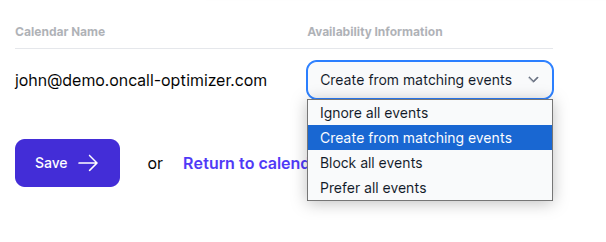
Calendars can now be configured to block or prefer all accepted events. For example, if you have a specific calendar containing only events you are unavailable for, you can configure On-Call Optimizer to create an availability block for each event imported from that calendar without needing to add individual “no-oncall” tags to each event.
The new behaviour can be configured on a per-calendar basis instead of the existing behavior of importing only matching events, which remains the default choice for existing calendars.
The calendar configuration screen has a new drop-down replacing the old toggle button to allow configuration of the new behaviour while also preserving the existing behaviour.
User and Domain Aliases
Support for aliasing user email addreses and organization domain names between On-Call Optimizer and external systems has been added. This enables use of On-Call Optimizer in cases where the email address of the account used to login to On-Call Optimizer does not align with the email address used in an on-call product (e.g. user@company.com has an account under user@company.co in Pagerduty).
User and Domain aliases are an advanced feature not exposed by default - please contact us if you need this enabled on your account.
Bugfixes and minor changes
- Added help tooltips to schedule and assignment configuration views.
- Fixed a regression that prevented assignee options for assignment groups being shown in the shift configuration.
- Improved matching of shifts to exported overrides in external on-call products, in particular multiple consecutive overrides at a provider which are equivalent to a single shift in On-Call Optimizer are now recognized without triggering the need to be deleted and re-created.
- Fixed bug that showed the child schedule name rather than the actual assignee when viewing the shift of a parent schedule assigned to a nested child schedule.
- Optimized the layout of availabilty events on the member availability calendar to use less vertical space and improve the visual appearance.
- Fixed display of calendar cells with many events. If more than 5 rows of events need to be displayed in any cell, a link to display a popup window showing the remaining events will appear at the bottom of the cell.
- Fixed time zone handling in the calendar to always use the configured time zone for the current user when grouping events into days.
- The red/green color used for block/preference display on the member availability calendar has been improved to a less saturated value more in keeping with the rest of the calendar event colors.
- The export synchronization process has been improved to prevent a difference being reported when the shifts being exports from On-Call Optimizer are already present in the external destination in a slightly different form (e.g. a 2-day shift on On-Call Optimizer would previously require an identical 2-day override in the external destination, but will now accept 2 1-day overrides if their start/end times and assignees otherwise match what On-Call Optimizer would export).
8 - May 2025
Changes and updates released in May 2025
Calendar UI default
On-Call Optimzer now defaults to a calendar view to display the assignments and shifts for a schedule and associated information such as the availability of members.
This updated UI provides significant usability improvements and is the result of several months of testing and interation with a dedicated group of testers and early adopters.
Further details and screenshots are available in the Calendar view is here! blog post.
Bugfixes and minor changes
- Improved assignment quality for schedules with secondary assignees by fixing a bug in the calculation of how far apart each member’s shifts are expected to be spread.
- Email generated by On-Call Optimizer is now sent with headers to prevent auto-replies from being generated.
9 - April 2025
Changes and updates released in April 2025
Availability details and historical member visibility
Quality and balance details (including availability) displayed for future shifts now reflect the live state of the schedule:
- Availability information added/removed since the shift was assigned will be reflected in the shift popup making it easier to see at a glance the up-to-date status of who may be able to take or swap the shift.
- Members removed from the schedule since the assignment will not be shown in the availability or balance details.
A snapshot of the availability and balance details at the time the assignment was confirmed remains available when viewing the assignment directly via the ‘Assignments’ tab of the schedule.
Past members can also be included in balance tables on any assignment (live or historical) by clicking the ‘Show historic members and shifts’ link below the table.
Bugfixes and minor changes
The following bug fixes and minor changes were also released in April 2025.
- Fixed import of availability information from non-primary Google calendars.
- Changed the background and text colors used for calendar events to improve constrast ratios for better readability.
- Simplified assignee names by trimming the domain portion (after the @) of an assignee’s email address when it matches the domain of the organization.
- Reworded historical assignment descriptions to more clearly explain the contents and mechanism of confirmation.
10 - March 2025
Changes and updates released in March 2025
The following changes were released to On-Call Optimizer in March 2025
Assignment Groups
Assignment Groups provide a way to limit the members eligible to be assigned to a shift to a subset of the members in the schedule.
This allows for common use-cases such as gradually introducing new members to the schedule or reducing the workload of team members with additional duties to be managed directly within the schedule, where previously supporting these use-cases required creating additional nested schedule.
The nested schedule functionality remains available and can also be used together with assignment groups as required.
More details on setting up assignment groups can be found in the schedule configuration documentation.
Automatic Swap Requests
Members can now opt in to having swap requests automatically triggered for any shift that conflicts with a block in their availability information, helping to maintain schedule quality with minimal manual intervention.
There are two situations in which these types of conflicts can occur and from which an automatic swap request can be triggered:
- When a new block conflicting with a previously assigned shift is added to one of the member’s configured calendars
- When a new assignment chooses to assign a member to a shift that conflicts with an existing block (currently very rare, but will become more common due to the weighted availability changes described below)
In both cases, once the swap request has been triggered, the normal swap processing logic is followed to find another member able to accept the shift.
Automatic swap requests are disabled by default and must be turned on by each member from their profile page.
More details on this feature are available in the swap documentation.
Weighted Availability in Assignments
Availability preferences and blocks are now weighted based on how much they overlap with a shift, providing more flexible and accurate schedule generation.
What’s Changing?
Previously, any amount of overlap between an availability entry and a shift resulted in the entire shift being blocked or preferred for that member. In the case of schedules with a weekly shift pattern, this means that a single hour preference or block event on a member’s calendar would result in the entire week-long shift being preferred or blocked for the member!
On-Call Optimizer will now weight these overlaps proportionally when considering the cost/benefit of assigning each shift to a particular member:
- A 1-hour block occurring within a week long (e.g. 168 hour) shift will contribute less than 1% of its current impact on the algorithm.
- A 4-hour preference in a 24-hour shift will contribute 17% of its current impact on the algorithm.
- A full-day block overlapping a daily shift shift will be unchanged and continue to contribute 100% of it’s current impact on the algorithm.
More details on how the weighting is applied can be found in the availablity documentation.
Bugfixes and minor changes
In addition to the changes described above, the following bug fixes and minor changes were also released in March 2025.
- The remove member icon is no longer hidden from view when a member cannot be removed from a schedule. The icon now uses styling to indicate if the users is removable or not, and provides an explanatory tooltip on hover with the reason removal is prevented when disabled.
11 - February 2025
Changes and updates released in February 2025
The following changes were released to On-Call Optimizer in February 2025
Improved Swap Flexibility
In response to many requests, the flexibility of the shift swap functionality has been significantly increased to allow any schedule member to initiate a swap request for any upcoming shift assigned in the schedule, not just shifts assigned directly to them.
An additional shortcut to directly take an upcoming shift and assign it directly to yourself is now also available.
Both of these new capabilities are accessed via the shift popup described below.
Further improvements building on this flexibility including short-cuts to quickly take a partial portion of the current shift, and the ability to reassign any shift to a specific member are in progress and will also be launched in early March.
Shift Popup
The new swap actions described above, as well as other key details about a shift, are located in a new popup accessible by clicking or hovering over any shift displayed within the Overview or Assignments tab of a schedule.
Details of assignment factors that impacted on the quality of the assignment have also moved to be shown within the popup for each shift, rather than as a separate list next to the assignment on the main page.
The shift popup works with both the current table-based default shift layout and the upcoming calendar based preview layout.
Calendar UI Preview
Further to the initial Calendar UI released in January, additional calendar view support has been added to the home and schedule overview pages.
Calendar view is now available on the following pages:
- Your
Homedashboard, showing your personal upcoming shifts and availability. - The schedule
Overviewtab, showing the assigned shifts (historical and upcoming) for the schedule as well as the shifts planned to be assigned in the next automatic assignment. - When viewing the details for a specific assignment via the
Assignmentstab of a schedule.
We expect to finish the calendar functionality and migrate all users to it as the default On-Call Optimizer experience in March, however for now it remains as an opt-in preview which can be enabled or disabled using the link shown in the top banner of the application.
Please continue to try it and report any bugs or rendering issues you encounter.
SOC2
On-Call Optimizer’s SOC2 type 2 audit window begun in the last week of February.
12 - January 2025
Changes and updates released in January 2025
The following changes were released to On-Call Optimizer in January 2025
Product Improvements
- The synchronization logic used between On-Call Optimizer and external destinations (e.g. Pagerduty) was improved to more robustly handle the presence of overlapping and conflicting shifts in the destination. On-Call Optimizer will now remove all shifts in the destination which conflict with the intended shifts being exported.
Calendar UI Preview
A much requested calendar based interface to schedules and assignments is now available as an opt-in preview which can be enabled or disabled using the link shown in the top banner of the application.
Calendar view is currently available on the following pages:
- When viewing the details for a specific assignment via the
Assignmentstab of a schedule.
Calendar support on additional pages will be added in the coming weeks.
Adventurous users are encouraged to enable the preview and report any bugs or rendering issues they encounter.
Certifications
On-Call Optimizer’s certification journey has taken a significant step forward, with the completion of our first black box penetration test by Capture The Bug. The test found no major issues and reported only two minor risks related to support for older TLS algorithms enabled in our load balancer which have since been disabled.
Our SOC2 preparation work with Advantage Partners continues smoothly, tracking towards audit commencement in mid to late February.
Bugfixes and minor changes
In addition to the changes described above, the following bug fixes and minor changes were also released in January 2025.
- To improve responsiveness, synchronization of configured destinations on a schedule now occurs immediately after the destination configuration is changed, rather than waiting until the next scheduled (e.g. hourly) synchronization of the schedule.
- Swapped shifts in a nested schedule did not trigger export of updated shifts to the destinations of any parent schedules depending on the child schedule.