July 2026
Changes and updates released in July 2026
Schedule configuration templates
Schedule configuration is being upgraded to use named templates.
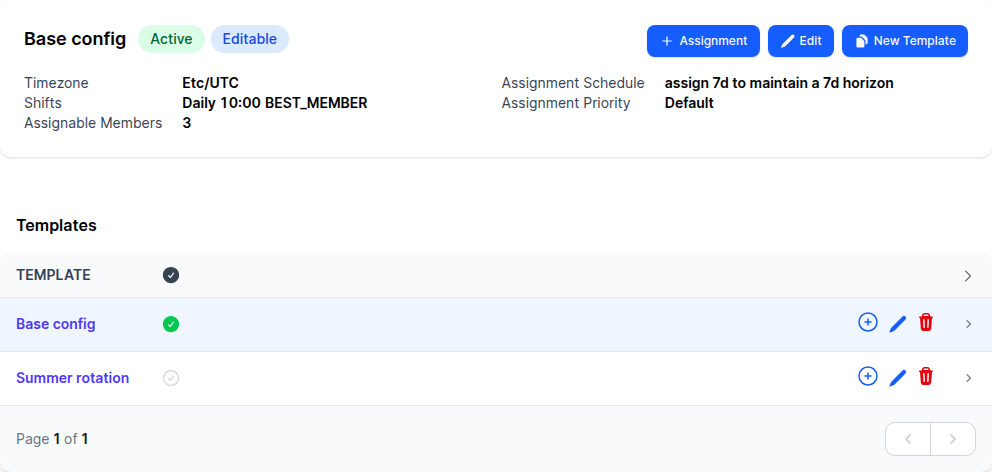
The Configuration tab of a schedule shows the currently active template alongside a list of any other templates defined for the schedule, and allows you to create, edit, activate and delete templates.
Templates make it easy to prepare alternative configurations ahead of time and switch between them as team circumstances change — for example keeping a “Summer rotation” alongside the regular configuration and activating it for the holiday period:
- Automatic assignments are generated from the currently active template.
- Custom assignments can be generated from any template, not just the active one.
- Every assignment saves a copy of the configuration from the template it was assigned from to provide an explicit versioned history of how the configuration of the schedule has changed over time.
For more details see the schedule configuration documentation.
PagerDuty shift-based schedules
PagerDuty’s newer shift-based schedules are now supported alongside the classic layer-based ones.
Both kinds of schedule behave the same in On-Call Optimizer:
- Members, time zone and shift pattern are read from the PagerDuty schedule when you link it.
- Shift history is imported so On-Call Optimizer can take past on-call into account when assigning.
- Assignments and swaps are exported as overrides, keeping PagerDuty up to date.
For more details see the PagerDuty integration documentation.
Bugfixes and minor changes
- Google Calendar events without a creator (such as automatically generated holiday or birthday events) no longer cause the calendar import for that calendar to fail.
- Imports from destinations in bidirectional mode no longer re-save unchanged shifts during confirmation, which previously caused assignees of unchanged shifts to be re-notified.
- Slack notifications containing very long error details are now truncated, with a link to the full details in On-Call Optimizer, instead of failing to send.
- Fixed an error when deleting a schedule that had previously included another schedule as a nested shift.
- Relaxed schedule Start Date validation to allow values from now onwards. Previously start date was required to be from 1 to 90 days in the future.
- Added extra checks to prevent shifts imported to a nested schedule being exported back to the destination they were imported from via the parent schedule.
- Improved handling of swap trimming and cancellation when a new import or assignment reassigns the shift the swap was requested for away from assignee requesting the swap.
- Fixed a bug preventing manual or custom assignment confirmation from ocurring concurrently with the assignment creation and confirmation initiated by an accepted swap request.
- Clarified reminder notification wording for members whose initial swap response required notification was deferred due to an availability block for the member being active when the notification was created. Members are now no longer told they are receiving a “2nd request” in these cases.