November 2026
Changes and updates released in November 2026
Delete organization members
Organization admins can now delete a member from the Members tab of the organization page. Deleting a member ends their access straight away. The member’s name and email are retained, along with their assigned shifts so history and balance calculations are unchanged.
Organization admins can opt-in to removing a deleted member’s personal details; their name and email will be replaced with “Deleted User” throughout the schedule history.
This feature is being turned on for organizations gradually. For details, see Member deletion.
Preview how a calendar’s events will be imported
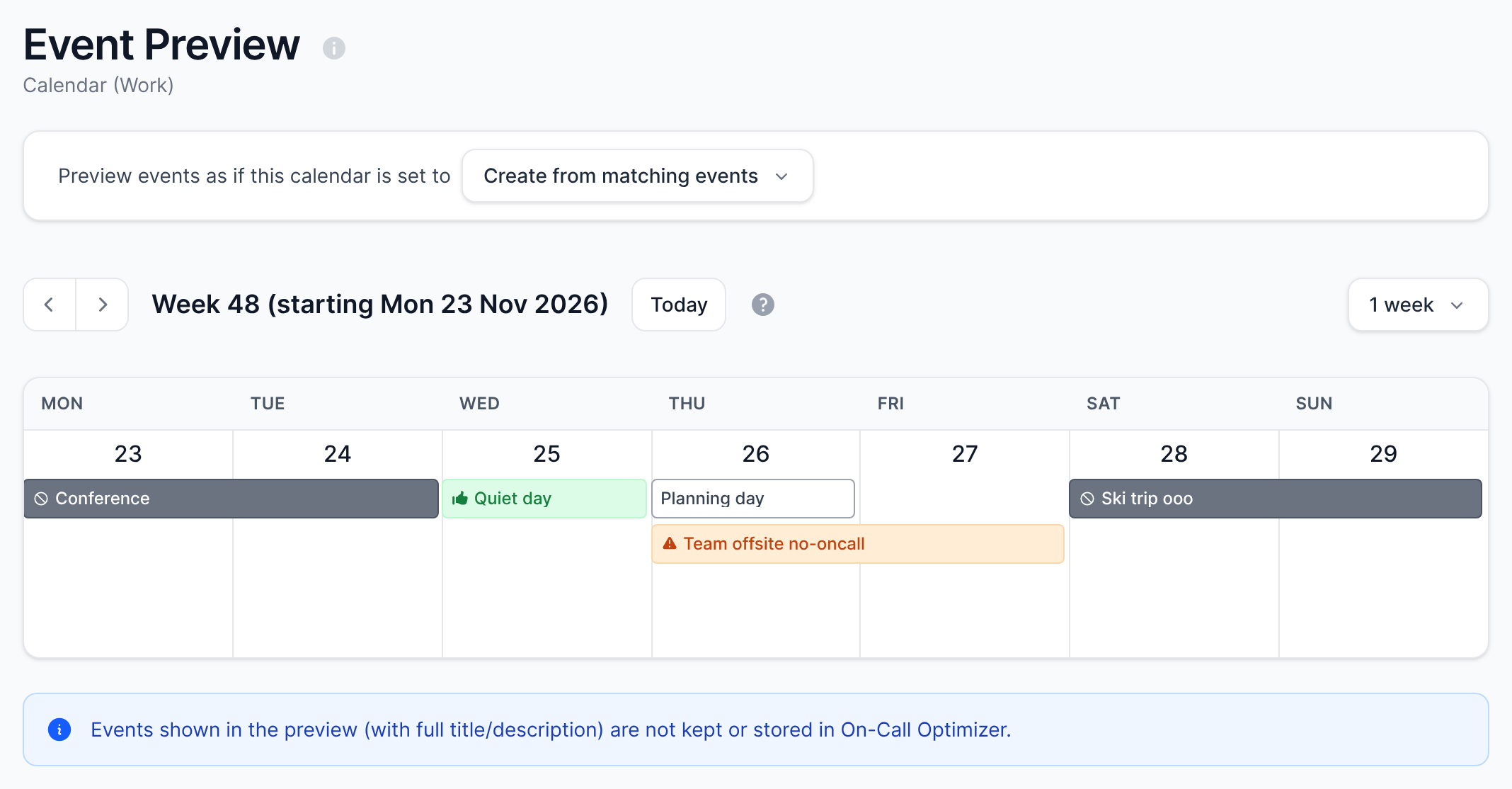
The new “Event Preview” page shows how each event on a connected calendar is (or is not) imported. It can be accessed for any selected calendar by clicking “Preview events” in the calendar’s row on your main calendar page, or for any calendar on a connection via that connection’s edit page.
The preview displays events coloured by how On-Call Optimizer would treat them, with full details available for each event on click or hover.
The preview also allows you to preview how the events would be imported using a different setting for that calendar.
For more details see the full event preview documentation.
Bugfixes and minor changes
- Fixed a schedule member’s availability preferences depending on how their shifts or availability were structured. A blocked or preferred period now counts the same whether the shift it overlaps is a single entry or split into several parts, and likewise whether it was recorded as one availability entry or several.
- Fixed attribution for swapped or reassigned shifts. These now remain attributed to the shift type they were originally assigned from in all balance calculations.
- Restored the ability to delete schedules with templates cloned from a previous version.
- Improved back-off behaviour when rate-limit (429) responses are received from a connected integration. On-Call Optimizer now honours any specified wait period before retrying the denied request and keeps subsequent requests on the connection below that rate, gradually attempting to ramp-up only when successive successful requests complete.
- Destination exports that used to fail after a single rate limit denial will now be considered successful when subsequent retries complete without error. A connection is only considered degraded or stalled when no progress can be made for 5 minutes.
- Fixed a server error when adding the same availability source to a schedule twice. Duplicate entries, including two rows in one save, are now rejected with an error message next to the offending row.
- Fixed a server error when viewing a calendar that includes on-call shifts imported from a connected on-call product while one of your shift swaps was outstanding. These shifts no longer show a swap indicator.
- Fixed the “N more” link on calendar days where there was no room to show an entry that started on an earlier day, such as a multi-day event. It was left out of the count; it is now included, and its details open from the “N more” list.
- Fixed swap indicators on calendars. A swap indicator now only appears on a shift in the schedule’s live assignment: draft shifts and failed imported shifts no longer show it.
- Fixed one-hour blocked availability entries not showing properly on the home calendar. They now appear as a grey dot in both light and dark mode.
- Fixed draft shifts hiding assigned shifts on the schedule calendar. When a change such as moving from weekly to daily shifts left a draft shift overlapping an assigned shift for the same role, the draft covered the assigned shift. The draft shift is now drawn on its own row directly beneath the role, and stays on the role’s row when the Assigned shifts layer is hidden.
- Fixed Custom assignment covering one day too many. A Custom assignment that runs for a number of days from its start date now covers exactly that many days, so one day assigns one day of shifts rather than two. The preview of upcoming shifts on the schedule setup page counts days the same way.
- Export to CSV now lets you choose which shifts to include. A dialog offers future shifts only (the default), future shifts plus 1, 3 or 6 months of history, or all shifts. History goes back only as far as the schedule keeps it.
- The Member availability layer now shows all future availability entries rather than only those up until the end of the next planned assignment.